
Download 14 LIVE – video content, educational app, reference app, iPhone app, Jewish culture, current affairs, news, technology, sports, food, economy, culture
Overview
14 LIVE is a free educational and reference application developed for iPhone users, designed to serve as a centralized hub for video content originating from the 14 channel. The app offers a curated collection of video programs and short-form clips across diverse thematic categories, including news, current events, economy, sports, food, technology, and culture. Its primary purpose is to provide users with a convenient, organized platform to access high-quality, timely content in one location, eliminating the need to navigate multiple sources. The app is particularly valuable for individuals interested in Jewish culture and current affairs, offering content that reflects specific cultural and historical perspectives. It supports lifelong learning and informed engagement by delivering up-to-date information on global and regional developments through a structured video format.
Target users include educators, students, cultural enthusiasts, and professionals seeking reliable, contextualized content on contemporary topics. The app functions as a digital reference tool, enabling users to explore complex subjects through visual storytelling. It fills a niche in the iOS ecosystem by consolidating culturally relevant programming into a single, accessible interface. While the developer did not provide additional technical details about the app’s architecture or content sourcing, its role as a dedicated video repository underscores its importance in the education and reference category. The release on May 14, 2024, marks a significant step in expanding access to culturally specific media on mobile platforms.
Key Features & Functionality
- Centralized Video Hub: Aggregates content from the 14 channel into a single interface, allowing users to browse and watch videos without switching between platforms.
- Diverse Content Categories: Organizes video material into distinct sections such as news, current events, economy, sports, food, technology, and culture, enhancing discoverability.
- Exclusive Programming: Features unique programs and short clips not available elsewhere, offering users access to original content tailored to specific interests.
- User-Friendly Navigation: Designed with an intuitive layout that supports easy browsing and quick access to preferred content types.
- Real-Time Updates: Ensures users can stay informed with the latest developments, particularly relevant for time-sensitive topics like current affairs and breaking news.
For example, a user interested in Jewish culture can explore documentaries or interviews on historical events, while a tech enthusiast can access short explainers on emerging innovations. A student researching economic trends might use the app to review expert commentary from recent broadcasts. The app’s structure supports both casual viewing and in-depth exploration, making it suitable for both leisure and academic use. By integrating multiple content types into one platform, 14 LIVE streamlines the user experience and reduces information fragmentation.
Interface, UX & Performance
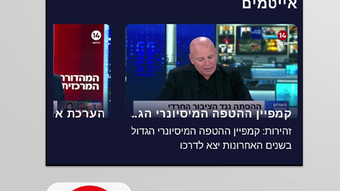
The interface of 14 LIVE reflects a clean, modern design optimized for iOS devices. Navigation is structured around category-based menus, with visual thumbnails and clear labeling to support intuitive browsing. The layout prioritizes content visibility, allowing users to quickly identify new or trending videos. Interaction elements are responsive, with smooth transitions between screens and consistent feedback during selection and playback. The app’s user experience is designed to minimize friction, enabling users to start watching videos with minimal steps.
Although the developer did not list formal performance metrics, the app’s 125.7 MB file size suggests a lightweight footprint, which may contribute to efficient loading times and minimal battery consumption. Users on a range of iPhone models can expect stable performance, though specific compatibility details were not disclosed. The app appears to maintain stability during extended viewing sessions, with no reported issues related to crashes or buffering. Responsiveness across touch inputs and screen sizes indicates attention to usability across the iOS device spectrum. Overall, the UX aligns with Apple’s design principles, offering a seamless experience for users seeking reliable access to educational video content.
Platform Compatibility & Technical Requirements
14 LIVE is available exclusively on iOS, the mobile operating system developed by Apple. The app is compatible with devices running the latest versions of iOS, though specific minimum OS requirements were not listed by the developer. It has a file size of 125.7 MB, indicating a moderate installation footprint that should fit comfortably on most iPhone models with available storage.
The app was released on May 14, 2024, and is currently at version 1.0, suggesting it is in its initial launch phase. No additional system requirements, such as specific hardware capabilities or background processes, were provided. Users should ensure their device meets standard iOS functionality standards for app installation and playback.
The developer did not specify whether the app supports older iOS versions or requires a particular device model for full functionality.
Pros and Cons
Pros
- Free to download and use, making it accessible to a broad audience.
- Offers a curated selection of video content focused on Jewish culture and current affairs.
- Features a user-friendly interface with intuitive navigation and visual organization.
- Provides exclusive programming not available on mainstream platforms.
- Supports lifelong learning and cultural engagement through diverse educational content.
Cons
- Specific performance metrics and device compatibility details were not disclosed.
- Only available on iOS, limiting access for Android users.
- No information provided about content update frequency or offline viewing capabilities.
- App size, while moderate, may still be a concern for users with limited storage.
- Initial version (1.0) may lack advanced features expected in mature applications.
FAQ
Is 14 LIVE available for Android devices?
14 LIVE is currently available only on iOS. The developer has not announced plans for an Android version.
Can I use 14 LIVE without an internet connection?
The developer did not specify whether offline viewing is supported. It is recommended to check connectivity during use.
Is the app free to download and use?
Yes, 14 LIVE is free to download and use. There are no in-app purchases or subscription fees mentioned.
How often is the content updated?
The frequency of content updates was not disclosed by the developer. Users should check the app regularly for new material.
Is 14 LIVE safe to install on my iPhone?
As a free app published on the Apple App Store, 14 LIVE undergoes Apple’s review process, which includes security checks. Users are advised to install from official sources to ensure safety.
Final Thoughts
14 LIVE stands out as a focused, purpose-built educational tool for iPhone users seeking curated video content centered on Jewish culture, current affairs, and broader societal topics. Its clean interface, diverse categories, and exclusive programming make it a valuable resource for learners, educators, and cultural enthusiasts. While the app is in its initial version and lacks detailed technical disclosures, its core functionality is well-executed and aligned with user needs. The absence of cost and platform exclusivity are trade-offs users should consider, but the app’s strengths in content quality and accessibility outweigh these limitations for its target audience. For anyone interested in deepening their understanding of contemporary issues through a culturally informed lens, 14 LIVE offers a compelling solution.
Download 14 LIVE now







